Montana Land Ownership Coverage
Our parcel coverage map lets you know at a glance which states and counties we have private land owner data for in our products. Due to differing state regulations and availability of data, we currently do not have complete coverage for every state and county. However, if a state or county makes the parcel data available, we make every effort to include it in future updates.
Note: The purpose of this map is to depict private land parcel coverage. Public land and other map layer coverage is statewide. Please note that there may be parts of some counties that do not have coverage or have unknown private landowner names.
Montana Hunting Map Layers
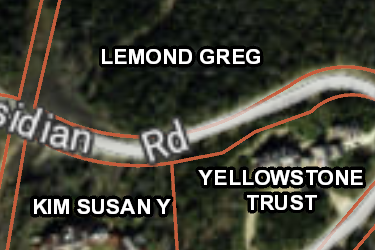
MT Private Lands
Over 540,000 parcels mapped by the onX team, this layer helps you know who the property owners are in Montana. Tap any parcel to learn more info about the owner and acreage.
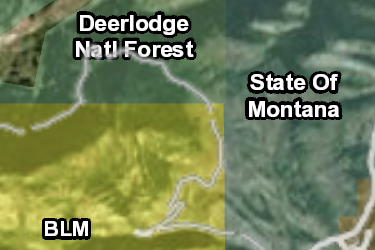
MT Gov Lands
onX has the most accurate maps of Gov Lands, covering over 40,000,000 acres in Montana. Not all Gov Lands offer access opportunities, check regulations before recreating.
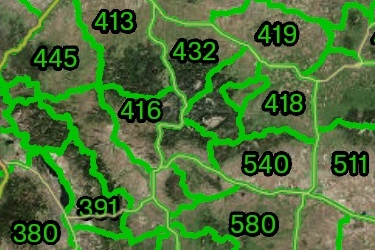
MT Hunting Districts
Antelope, Bighorn Sheep, Bison, Bear, Deer/Elk, Fisher, Wolf, Moose, Mountain Goat, Trapping, Turkey, Migratory Bird, Upland Bird, and Swan Hunting Districts.
Includes 17 Sublayers
- Antelope Hunt District
- Bighorn Sheep Hunt District
- Bison Hunt District
- Black Bear Hunt District
- Deer / Elk Hunt District
- Fisher Mgmt Unit
- Gray Wolf Hunt District
- Moose Hunt District
- Mtn Lion Mgmt Unit
- Mtn Goat Hunt District
- Trapping Districts
- Spring Turkey Hunt District
- Fall Turkey Hunt District
- Migratory Bird Hunt District
- Swan Hunt District
- Upland Game Bird Hunt District
- Blackfeet Tribal Hunt Zones
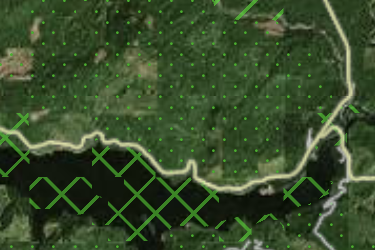
MT Possible Access
onX has mapped 1,100,000 acres of possible access lands in Montana including timber companies and land conservation groups. Research rules on these private lands before recreating.
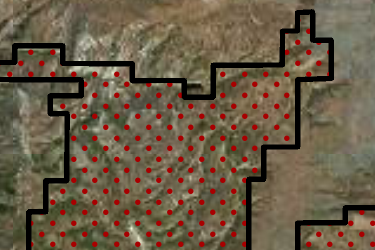
MT Block Management
The Montana Fish, Wildlife and Parks Block Management. All hunters are expected to know the rules of the program. Please hunt responsibly and have a safe legal hunt.
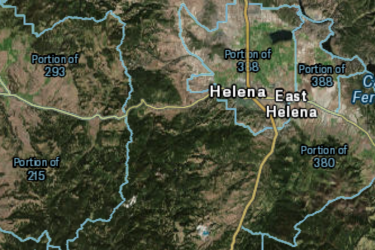
MT Hunting Districts Portions
Montana Hunting District Portions are a sub unit of the hunting district that has its own given tag or special regulations compared to the corresponding hunting district.
Includes 11 Sublayers
- Bison Portions
- Elk Portions
- Mtn Goat Portions
- Moose Portions
- Mule Deer Portions
- Upland Bird Portions
- Whitetailed Deer Portions
- Furbearer Portions
- Migratory Bird Portions
- Black Bear Portions
- Bighorn Sheep Portions
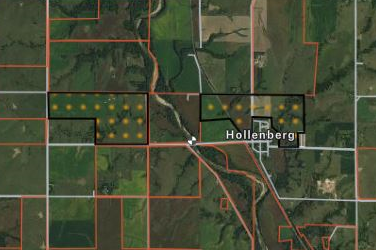
MT Upland Game Bird Project
The Montana Fish, Wildlife and Parks Upland Bird Game Projects (Open Fields program). All hunters are expected to know the rules of the program.
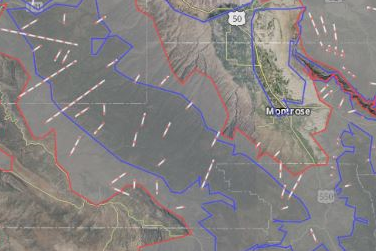
MT Game Distribution
Montana Various Game Winter and General Distributions
Includes 11 Sublayers
- Whitetail Deer
- Mule Deer
- Elk
- Mountain Lion
- Ruffed Grouse
- Spruce Grouse
- Sharptail Grouse
- Hungarian Partridge
- Sage Grouse
- Dusky Grouse
- Turkey
App Overview

Increase success as you layer BLM, forest service, private property and more over aerial imagery, and topographic basemaps, for the most accurate map on mobile device and desktop.
See invisible property lines and seek permission with detailed private and government property boundaries and ownership names.
View trails, roads and accesses to narrow the hunt and always know where you stand.
- Landowner names & boundaries
- Satellite imagery with topo lines
- Offline maps
- Sync mobile and computer
- GPS, waypoints, tracks, and markups
- Color-coded public lands
- State-specific map layers
- Roads & trails
- Hunting zones, units, districts and areas
- Search by landowner, places or coordinates
- Mark and measure areas
onX Membership Overview
Map details
- Private landowner names, boundaries, and tax address
- Government lands—federal, state, county, local and non-profit
- 2022 BMA (Walk-In Area) Access Lands
- 2022 Open Fields Access Lands
- 2022-23 Big Game Hunting Districts – Deer, Elk, Lion
- 2022-23 Antelope Hunting Districts
- 2022-23 Big Game Hunting District Restricted Areas
- Wilderness areas
- Roads, trails and trailhead names and numbers
- Point of interests—geographic and recreational
- Water—rivers, creeks and lakes with flow direction
- Weather and radar
- Campgrounds
- 24K topo
- Section lines and numbers
- Fishing access locations and boat ramps
- Recreation sites
- National Park visitor maps
- Historic wildfire perimeters
- Active fires
- Possible access lands
- Much more
Compatibility
onX Hunt prides itself in offering a multi-platform mapping system. Hunt App works on iOS and Android mobile phones as well as provides access to our mapping solutions from your computer.
Map updates
As land ownership, hunting areas, and other map data change we update the map data on our servers. This new map data will automatically be loaded to your Hunt App without you having to do anything.
onX Hunt GPS Chip
Important announcement regarding the onX Hunt Chip
Effective immediately, the onX Hunt Chip for 29 of the 50 U.S. states will no longer be available for purchase. The final 21 states will still be available for purchase through Dec. 31, 2022. Click “Learn More” below to find out when the onX Hunt Chip will be discontinued for this state.
Chip Updates
Version 22.0 Released on: Sept 01, 2022
- Update 2022-23 BMA properties to the 2022 Hunting Season *current as of 9/1/22
- Update 2022-23 Upland Game Birds to the 2022 Hunting season *current as of 9/1/22
- 2022-23 Big Game Hunting Districts—Deer, Elk, Lion *current as of 9/1/22
- 2022-23 Antelope Hunting Districts *current as of 9/1/22
- 2022-23 Big Game Hunting District Restricted Areas *current as of 9/1/22
- Updated land ownership statewide
Version 21.2 Released on: Nov 9, 2021
- Updated land ownership in the following counties: McCone
Version 21.1 Released on: Oct 26, 2021
- Updated land ownership in the following counties: Jefferson, Missoula
- Update 2021 BMA properties to the 2021 Hunting season *current as of 10/25/21
- Update 2021 Upland Game Birds to the 2021 Hunting season *current as of 10/25/21
Version 21.0 Released on: Aug 27, 2021
- Updated land ownership statewide
- Update 2021 BMA properties to the 2021 Hunting Season *current as of 8/25/21
- Update 2021 Upland Game Birds to the 2021 Hunting season *current as of 8/25/21
Version 20.2 Released on: Oct 21, 2020
- Updated land ownership statewide
- Update 2020-21 BMA properties to the 2020 Hunting Season *current as of 10/6/20
- Update 2020-21 Upland Game Birds to the 2020 Hunting season *current as of 10/6/20
Version 20.1 Released on: Sep 3, 2020
- Update 2020-21 BMA properties to the 2020 Hunting Season *current as of 9/3/20
- Update 2020-21 Upland Game Birds to the 2020 Hunting season *current as of 9/3/20
Version 20.0 Released on: July 15, 2020
- Updated Big Game Hunting Districts-Deer, Elk, Lion to 2020-21 Hunting Regulations
- Updated Antelope Hunting Districts to 2020-21 Hunting Regulations
- Updated Big Game Hunting Restricted Areas to 2020-21 Hunting Regulations
Version 19.2 Released on: Sep 4, 2019
- Updated BMA (Walk-In Area) Access Lands *current as of 9/4/19
- Added BMA number and type into the name of the BMA
Version 19.1 Released on: Aug 20, 2019
- Update to Block Management Areas (BMA) *current as of Aug. 12, 2019
- Update to Open Fields Access Lands *current as of Aug. 19, 2019
- Update to Unlocking State Lands Access Points *current as of Aug. 19, 2019
Version 19.0 Released on: Apr 30, 2019
- Updated land ownership statewide
- Updated Big Game Hunting Districts—Deer, Elk, Lion to 2019-20 Hunting Regulations
- Updated Antelope Hunting Districts to 2019-20 Hunting Regulations
- Updated Big Game Hunting District Restricted Areas to 2019-20 Hunting Regulations
Version 18.2 Released on: Aug 20, 2018
- Updated land ownership statewide
- Updated Block Management Areas to 2018 season
- Update Upland Game Bird Project Areas to 2018 season
- Update Unlocking State Lands Access Points to 2018 season
- Updated motorized use trails in the Pipestone area
Version 18.1 Released on: May 24, 2018
- Updated Big Game Hunting Districts—Deer, Elk, Lion to 2018-19 regulations
- Updated Antelope Hunting Districts to 2018-19 regulations
- Update Big Game Hunting District Restricted Areas to 2018-19 regulations
- Added additional Recreational Point data to Yellowstone National Park, and Glacier National Park
- Updated trails in Glacier National Park
- Added statewide snowmobile trails
- Added new multi use trails in the Flathead Valley
Version 18.0 Released on: Feb 16, 2018
- Updated land ownership statewide
- Added Wilderness Study Areas